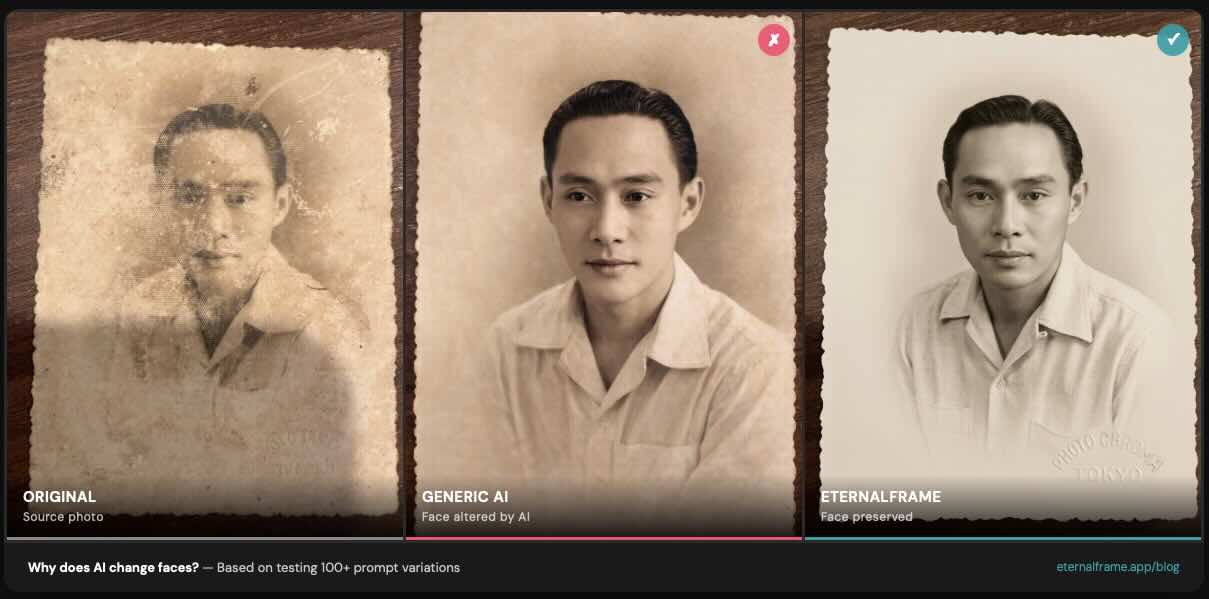
When I started building EternalFrame, I assumed the hard part would be getting AI to enhance old photos - fixing the fading, adding color, cleaning up damage. I was wrong. The hard part was getting AI to stop changing people's faces.
Early on, I restored a photo of my wife's grandfather for her family. The result looked beautiful - clean, colorized, sharp. But when my mother-in-law saw it, she paused and said quietly, "That's not quite him." The eyes were a little different. The jawline had shifted slightly. The AI had created a version of him that was close, but not him.
That one moment sent me down a months-long research rabbit hole. I built an automated testing pipeline, ran over 100 prompt variations, and systematically figured out what causes this problem and how to prevent it. This article is everything I learned.
The Problem: Face Drift
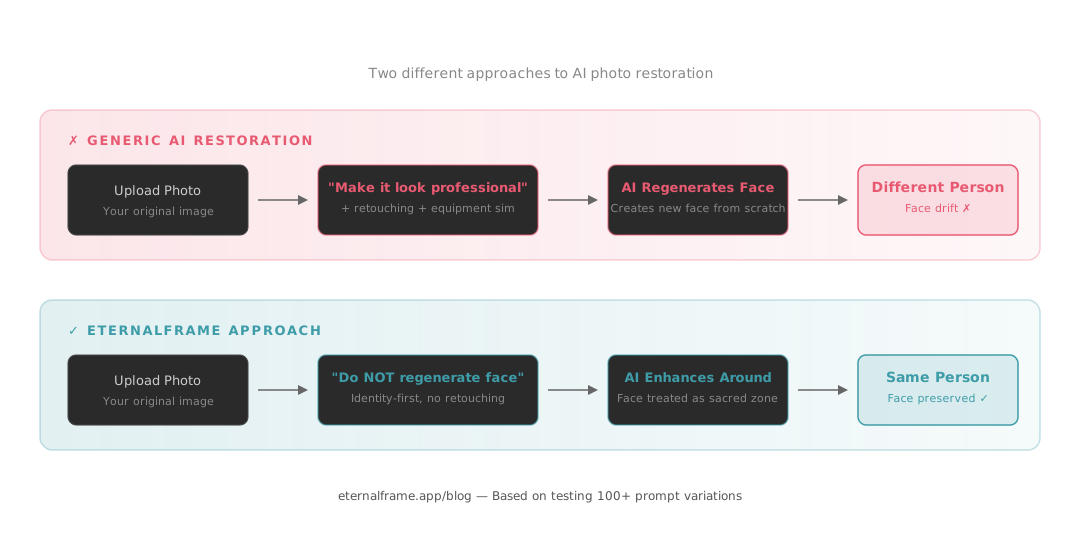
Face drift occurs when an AI model regenerates facial features instead of preserving them. Rather than enhancing what's already in the photo, the model creates a new face that's similar to the original but not identical.
You've probably experienced this yourself. You upload a photo to ChatGPT, Remini, or another AI tool, and the person comes back looking... almost right. The smile is slightly wrong. The nose is a bit different. It's uncanny because it's close enough to recognize, but different enough to feel wrong.
This is especially painful for memorial portraits and family photos, where the whole point is to honor the person as they actually looked. An AI-generated approximation of someone's grandmother isn't the same as a carefully restored original.
What makes it worse
Through our automated testing pipeline - where an LLM judge scores each restoration result against specific criteria - we found several factors that dramatically increase face drift:
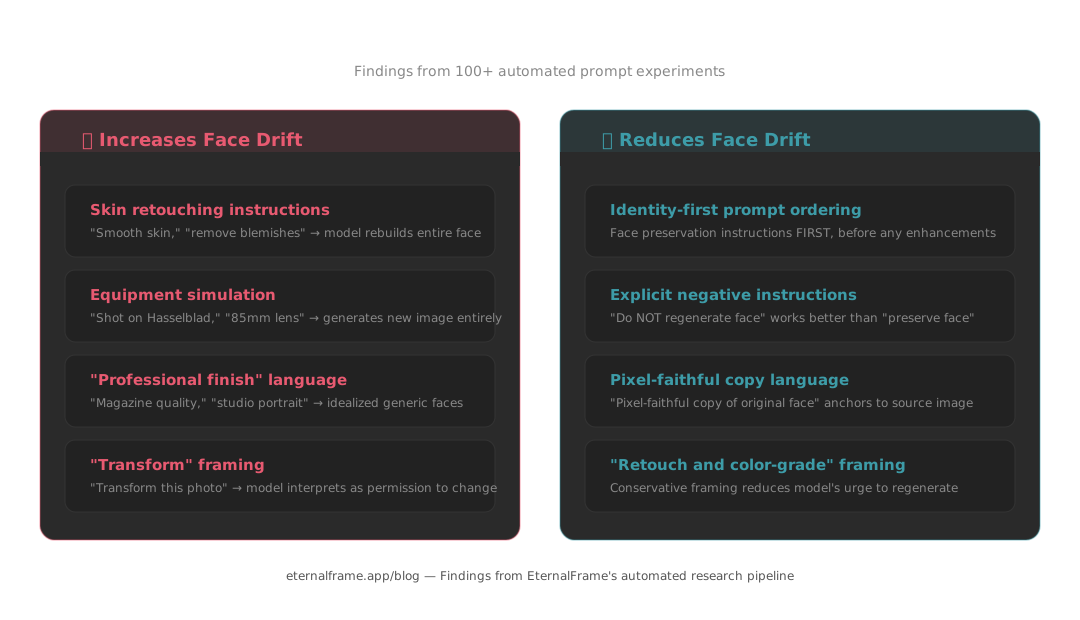
- Skin retouching parameters: Instructions that ask the AI to "smooth" or "retouch" skin cause it to regenerate the entire face, not just the skin texture
- Equipment simulation: Prompts referencing specific camera equipment (like "shot on Hasselblad" or "DSLR quality") encourage the model to generate a new image rather than restore the existing one
- Professional finish language: Terms like "magazine quality" or "studio portrait" push the model toward generating idealized, generic faces
- Beautification of any kind: Even subtle cosmetic enhancements - brighter eyes, smoother skin, whiter teeth - give the model permission to alter facial features
The common thread: anything that tells the AI "make this face look better" gets interpreted as "make a new face."
What We Found
I built an automated evaluation system that generates restorations, then uses a separate AI model to judge each result on specific criteria like face preservation, lighting quality, color accuracy, and sharpness. This let me test at scale - iterating through prompt variations much faster than manual review.
For our warm-family preset alone, we ran 15 iterations across 3 different test photo types (a 1940s B&W family group of 5 people, a couple with a baby, and a multi-generational group of 6). Each iteration changed specific prompt parameters and measured the impact on face fidelity.
The findings were consistent across every preset we tested:
What reduces face drift:
- Identity-first prompt ordering - placing face preservation instructions at the very beginning of the prompt, before any enhancement instructions. This was one of the biggest single improvements we found. The AI pays more attention to instructions that come first.
- Explicit negative instructions - telling the model "do NOT regenerate or reconstruct the face" is significantly more effective than saying "preserve the face." The negative framing sounds counterintuitive, but it works because it sets a hard boundary rather than a soft preference.
- Pixel-faithful copy language - using specific phrases like "pixel-faithful copy of the original face" anchors the model to the source image. Vague instructions like "keep it similar" give the model too much creative license.
- Removing retouching language entirely - not just toning it down, but eliminating all skin smoothing, blemish removal, and cosmetic enhancement from the prompt. These fields actively cause face regeneration.
What increases face drift:
- Equipment simulation references ("shot on Hasselblad," "85mm lens")
- Magazine/editorial quality descriptors ("professional finish," "studio quality")
- Any skin retouching or cosmetic enhancement language
- High creativity/temperature settings in the model
- "Transform" framing - saying "transform this photo" instead of "retouch and color-grade this photo"
That last one surprised me. The word "transform" alone was enough to make the model more aggressive about changing faces. Swapping it for "retouch and color-grade" - a more conservative framing - reduced face alterations noticeably.
How We Fixed It
Based on these findings, we restructured every restoration preset in EternalFrame:
- Face preservation rules come first - every prompt begins with explicit instructions to maintain the original person's identity, before any mention of enhancement or styling
- No retouching by default - we removed all skin smoothing, cosmetic enhancement, and equipment simulation parameters from our prompts. These fields were actively harmful.
- Negative constraints before positive instructions - we tell the model what not to do before telling it what to do. "Do NOT regenerate faces. Do NOT alter facial features. Now, enhance the lighting and color-grade the image."
- Controlled enhancement zone - restoration improvements like lighting, clarity, and color are applied to the overall image while the face region is treated as a preservation zone, not an enhancement target
The result: face drift dropped significantly across all our presets. Our automated evaluations showed consistent improvement in face preservation scores while maintaining high quality for lighting, color, and overall restoration.
What This Means for You
If you're trying to restore old family photos, here's the practical takeaway:
If you're using ChatGPT, Midjourney, or other general AI tools:
- Put "do NOT change, regenerate, or alter the face" at the very start of your prompt
- Remove any language about retouching, smoothing, or beautifying
- Use "retouch and color-grade" instead of "transform" or "create"
- Avoid equipment references like "DSLR" or specific camera models
- Keep your prompts short and focused - longer prompts with more instructions give the model more opportunities to drift
If you're choosing a dedicated restoration tool: Look for apps that specifically talk about identity preservation and face fidelity - not just "amazing results" or "studio quality." If a tool's marketing is all about making photos look "professional" or "magazine-worthy," that's often a sign they're optimizing for aesthetics over accuracy. The best restoration keeps the person looking like themselves, even if the result is slightly less polished.
Honest Limitations
I believe in being transparent about what AI can and can't do today:
- Large groups (6+ people): Current AI models still show subtle face alterations when there are many faces in a single image. We've minimized this with techniques like front-fill lighting, but it's a genuine model limitation that no amount of prompt engineering fully solves.
- Severely damaged originals: If the original photo is heavily damaged in the face area - torn, water-stained, or badly faded - any restoration will involve some generation. We minimize this, but you can't preserve detail that no longer exists in the source.
- B&W colorization softness: Adding color to black-and-white photos tends to produce slightly softer output. This is a consistent finding across our testing and appears to be a model-level limitation rather than a prompt-level one.
- Run-to-run variance: AI models have inherent randomness. Two restorations of the same photo will be slightly different, though both should preserve identity. In our testing, we saw 2-3 point score swings between runs of the same prompt, which is just the nature of generative AI.
These limitations are common across all AI restoration tools. The difference is whether a tool is engineered to minimize them or just ignores them entirely.
Want to see the difference for yourself? Try a free restoration at eternalframe.app/try and see how your family's faces are preserved - not changed.