In our previous articles, we shared what we learned about why AI changes faces and what works for group family photos. Those findings didn't come from guesswork - they came from a system. This article is about that system.
It started with a spreadsheet. After the grandmother photo incident I described in our face drift article - where the AI produced a beautiful result that wasn't quite her - I started tracking every prompt change and its effect on face preservation. Within a week, the spreadsheet had 30 rows and I couldn't tell if version 12 was actually better than version 7. I was eyeballing results, losing track of what I'd changed, and second-guessing my own judgment.
EternalFrame has seven distinct presets - formal memorial portraits, Vietnamese ceremony photos, warm family portraits, vintage colorization, and more - each with its own success criteria and failure modes. Manual testing across all of them would take forever and produce inconsistent results.
So I built an automated evaluation pipeline inspired by Andrej Karpathy's autoresearch concept - the idea that any optimization problem with a measurable score can be turned into an automated loop: edit one variable, evaluate, keep improvements, discard failures, repeat. What Karpathy applied to ML research, we applied to prompt engineering. What was previously prompt art became prompt engineering.
The result: our warm-family preset went from below 12/18 to a consistent 15-16/18. Face drift dropped from roughly half of outputs to under 10%. This article is a technical walkthrough of the system and the surprising things we learned building it.
The Core Loop
The concept is simple. The implementation has some important nuances.

Each iteration takes 2-3 minutes and costs $0.15-0.30 in API calls. Results are cached, so you can re-score previous generations without regenerating images. Every improvement gets committed to git with the score in the commit message, giving you a full audit trail of what changed and why.
The Two-Model Architecture
This is the key design decision that makes the whole system work: the model that generates the image is NOT the model that judges it.
We use Gemini for generation and Claude Sonnet (with vision) for evaluation.

This matters because:
No self-serving bias. If you ask the same model to generate and evaluate its own output, it tends to rate itself favorably. Using a separate judge model gives you a more honest assessment.
Different strengths. Gemini is strong at image generation. Claude Sonnet is strong at structured analytical evaluation - it can reliably assess whether specific visual criteria are met in an image.
Independent iteration. When a new generation model comes out, we can swap it in and immediately evaluate it against our existing test suite using the same judge. This turns model comparison from "which looks better?" into a data-driven score comparison.
Designing Good Evaluation Criteria
This is where most automated eval systems fail. Bad criteria produce misleading scores, which lead you to optimize for the wrong things.
Our criteria design follows three rules:
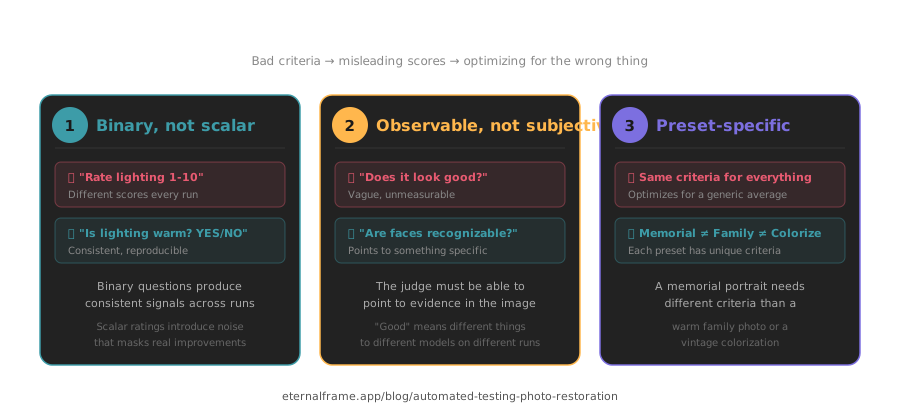
Rule 1: Binary, not scalar. Every criterion is a YES/NO question, never a "rate from 1 to 10." When you ask an LLM "rate the lighting quality from 1-10," you'll get different numbers on different runs for the same image. When you ask "is the lighting warm and even across all subjects? YES or NO," responses are far more consistent.
Rule 2: Observable, not subjective. "Does it look good?" is a terrible criterion. "Are all faces in the output recognizably the same people as in the input?" is a good one. The judge needs to point to something specific in the image.
Rule 3: Preset-specific. A formal memorial portrait needs a neutral dark background and dignified lighting. A warm family photo needs bright, natural lighting and warm color grading. Sharing criteria across presets would optimize for a generic average instead of preset-specific excellence.
Here's the criteria set for our warm-family preset (the same preset we tested extensively in our group photos article):
| Criterion | Judge Question |
|---|---|
| Face preservation | Are all faces recognizably the same people as in the input photo? |
| Warm tone | Does the output have warm, inviting color tones? |
| Soft lighting | Is the lighting soft and flattering across all subjects? |
| Natural grouping | Do the subjects look naturally positioned relative to each other? |
| Sharpness | Is the output crisp and detailed, not soft or blurry? |
| Photo extraction | If the input is a phone-of-photo, are capture artifacts removed? |
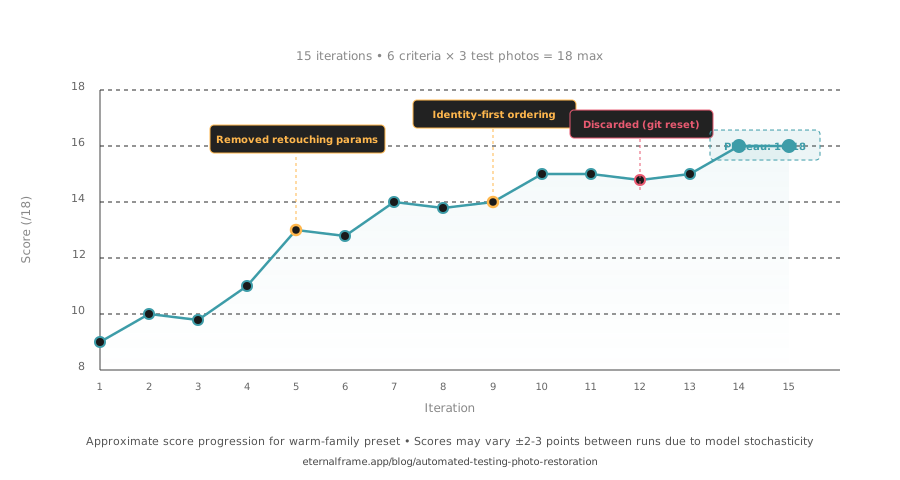
6 criteria x 3 test photos = 18 maximum score per iteration.
Choosing Test Photos
The test photos are just as important as the criteria:
Cover the edge cases, not the easy cases. If you only test with high-quality, well-lit single portraits, your prompt will score great - and then fail on real user photos. We deliberately include faded vintage B&W, large groups (6+ people), and phone-of-photo captures.
Minimum three photos per preset. Generative AI models have significant run-to-run variance. With a single test photo, you can't tell if a score change is from the prompt edit or from model stochasticity. Three photos gives you enough signal to distinguish real improvements from noise.
Fixed test set across all iterations. Never change your test photos mid-optimization. If you do, you can't compare scores across iterations. Pick them once, commit them, leave them alone.
A Real Iteration: Warm-Family Preset
To make this concrete, here's what an actual iteration looked like.
Iteration 6 → 7 (score: 12/18 → 15/18)
We made three changes simultaneously based on the previous iteration's per-criterion scores:
| Change | Rationale (from scores) |
|---|---|
| Switched from JSON descriptor to text template prompt | Criteria showed inconsistent behavior - JSON assembly was producing conflicting instructions |
| Changed "Create a professional portrait" → "Retouch and color-grade this cherished photo of a loved one" | Face preservation was failing on 2/3 photos - less aggressive framing to reduce face regeneration |
Removed equipmentReference, skinRetouching, professionalFinish fields |
These three fields were the only common factor across all face-drift failures |
The score jumped from 12 to 15 in a single iteration. Face preservation went from 1/3 to 3/3. The commit message:
autoresearch(family): 15/18 (+3) - text template, emotional framing, remove face-drift fields
This was our single highest-impact iteration across any preset. Everything after it was incremental - moving from 15 to a consistent 15-16 over the next 8 iterations.
What Surprised Us
Shorter prompts consistently score equal or better
Early iterations always involved adding more instructions: more detail about lighting, more specific face preservation language, more background guidance. But when we measured, longer prompts didn't score higher. In several cases, removing entire sections improved scores.
Our hypothesis: Gemini handles focused instructions better than exhaustive ones. A 10-line prompt with clear priorities outperforms a 40-line prompt where the model has to figure out what matters most.
Prompt instruction order has a measurable impact
We discovered this almost by accident. When we moved face preservation instructions from the middle of the prompt to the very top, face preservation scores jumped - without changing a single word. Just reordering.
This suggests that Gemini (and likely other models) pays more attention to instructions that appear first. For our use case, the most critical constraint - "do NOT alter faces" - must be the first thing the model sees.
Negative instructions outperform positive instructions
"Do NOT regenerate or reconstruct the face" consistently outperforms "Preserve exact facial likeness." We tested this across multiple presets and the pattern held every time. We covered this in depth in our face drift article - it was one of our most important findings.
Our interpretation: positive instructions describe a desired outcome the model can interpret loosely. Negative instructions set a hard boundary. "Preserve likeness" leaves room for interpretation. "Do NOT regenerate" leaves none.
Similarly, anchoring language like "pixel-faithful copy of the original face" outperformed vague preservation requests across every preset. The more specific and restrictive the constraint, the better the model respects it.
Emotional framing affects output quality
This was genuinely surprising. When we changed "Create a professional portrait from this photo" to "Retouch and color-grade this cherished photo of a loved one," face drift decreased measurably. The word "cherished" appears to signal to the model that the source material should be treated conservatively. We saw the same effect amplified in group photos, where emotional framing reduced drift across multiple faces simultaneously.
We don't have a rigorous explanation for why this works. It's possible that training data associates emotional language with careful handling, or that "cherished" correlates with prompts emphasizing preservation over creation. Either way, the score improvement was consistent and reproducible across presets.
Some parameters are actively harmful across all presets
We found three JSON descriptor fields that caused face drift across every preset we tested: equipmentReference, skinRetouching, and professionalFinish. Removing all three was one of our highest-impact single changes.
These fields weren't in our prompts by accident - they seemed like they would improve quality. But in practice, all three told the model to regenerate faces rather than preserve them. This is the kind of finding you'd never get from manual testing - the effect is subtle enough that you'd attribute it to random variation rather than a specific parameter.
We validated this finding across our ceremony, studio, and formal-memorial presets - the same three fields caused face drift in every single one. That cross-preset consistency is what gave us confidence to remove them permanently rather than just tweak them.
Practical Considerations
Run-to-run variance is real
Generative AI models are stochastic. The same prompt with the same input photo will produce slightly different output every time. In our testing, we saw 2-3 point score swings between identical runs.
This means you can't trust a single evaluation. If your score goes up by 1 point, that might be noise. We consider a change meaningful only if it produces a consistent improvement across multiple test photos, ideally in the same criterion across photos.
The eval loop eventually plateaus
For every preset, we hit a point where further prompt changes produced no score improvement. For warm-family, this happened around iteration 15 at 16/18. The remaining 2 points were blocked by model-level limitations - B&W colorization softness and large-group face drift - that no amount of prompt engineering could overcome.
Knowing when to stop matters. Past the plateau, you're making lateral moves. The remaining improvements will come from better models, not better prompts.
Cache everything
Image generation is slow and potentially expensive. Our pipeline caches generated images and scores separately:
- Re-score cached images without regenerating (useful when refining judge criteria)
- Skip generation for unchanged test photos
- Compare scores across different judge configurations on the same outputs
Cache structure: prompts/.cache/{preset}/ with generated images and score files per iteration.
Cost breakdown
For a single preset optimization (15 iterations, 3 test photos):
| Component | Cost per iteration | Total (15 iterations) |
|---|---|---|
| Gemini generation (3 photos) | ~$0.05 | ~$0.75 |
| Claude Sonnet scoring (6 criteria x 3 photos) | ~$0.15 | ~$2.25 |
| Total | ~$0.20 | ~$3.00 |
Across all 7 presets: roughly $20 in API costs. Compare that to the dozens of hours manual optimization would require - and the inconsistent results it would produce.
The Tooling
Each preset has its own eval.py that imports shared modules:
prompts/
├── shared/           # Shared eval modules
├── family/
│   ├── eval.py       # Warm-family preset evaluator
│   └── history/      # Each iteration's prompt + generated images
├── ceremony/
│   ├── eval.py
│   └── history/
└── .cache/           # Cached generations and scores
Running an eval:
# Full run: generate + score
python3 prompts/family/eval.py --verbose

# Re-score cached results only (no generation)
python3 prompts/family/eval.py --skip-generate --verbose
Each run takes 2-3 minutes. The --verbose flag shows per-criterion, per-photo scores so you can see exactly what improved and what didn't.
What We're Building Next
Automated prompt mutation. Currently a human decides what to change each iteration. We're building a closed-loop version where Claude suggests prompt edits based on the previous iteration's per-criterion failures - so the system can run 50+ iterations overnight without human intervention. Early tests show it finds the same optimizations a human would, plus a few we wouldn't have tried.
Cross-model benchmarking. When a new image generation model drops, we want to run our entire test suite against it automatically. Instead of "does this new model look better?", we get a score comparison across every preset and every criterion. We've already used this approach to compare Gemini model versions - it takes 20 minutes to benchmark a new model across all 7 presets.
The prompt engineering behind EternalFrame isn't guesswork - it's the direct output of this automated research pipeline. Every improvement our eval system finds ships straight to the app. If you're curious what 15 iterations of automated optimization looks like in practice, try a free restoration at eternalframe.app/try and see for yourself.