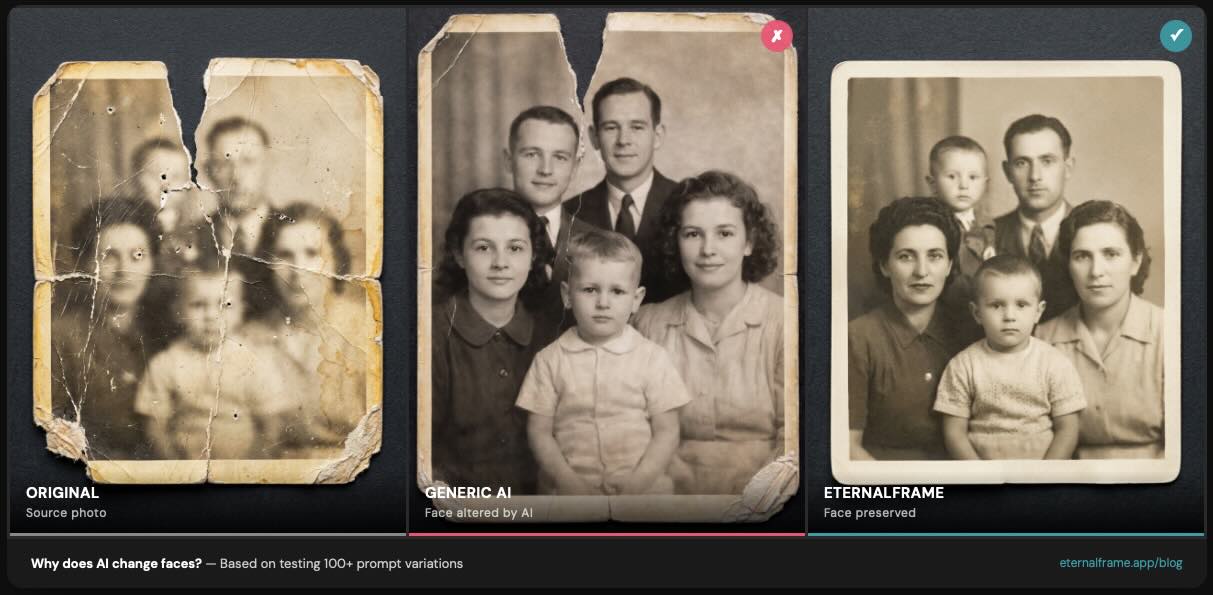
A few weeks ago, my mom asked me to restore a photo from my grandmother's death anniversary ceremony in the '90s - six family members gathered in front of the altar, three generations in one frame. It's one of maybe five photos from that day that survived.
I ran it through EternalFrame expecting solid results. After all, our single-portrait presets were performing well. What came back looked polished - but my uncle's face on the far right had shifted. My grandmother, small in the back row, looked like a different person. Out of six faces, only four were faithful to the original.
That result sent me into a focused sprint on group photo restoration. Fifteen rounds of automated testing, three different group photo types, and hundreds of prompt variations later - here's everything I learned about why group photos are uniquely hard, and what actually works.
Why Group Photos Are So Much Harder
When AI restores a single portrait, all of the model's attention is focused on preserving one identity. With a group photo, it has to preserve three, five, or eight faces simultaneously. Each additional face is another identity the model has to track, and the chances of something drifting go up with every person in the frame.
Think of it like a juggler. One ball is easy. Three balls, manageable. Six at once? Things start getting dropped.
But it's not just about the number of faces. Group photos bring challenges that single portraits don't:
- Varying face sizes - the person in front has a large, clear face. The person in the back row is a few pixels across. The AI handles large faces well and small faces poorly.
- Overlapping bodies - people standing close together, sometimes partially obscured. The AI has to figure out where one person ends and another begins.
- Mixed lighting - people on the left might be in shadow while people on the right are in sunlight. The AI needs to enhance both without making them look like they're in different photos.
- Phone-of-photo captures - many old group photos only exist as phone photos of printed pictures, adding glare, curvature, and reflections on top of the original's aging.
What We Tested
I set up an automated evaluation pipeline specifically for group photos:
Three test photos covering the hardest scenarios:
- A 1940s black-and-white family group with 5 people - the classic faded vintage challenge
- A couple with a baby - tests how the AI handles a small face next to adult faces
- A multi-generational group of 6 people captured as a phone-of-photo - the worst case, combining large group, phone artifacts, and age-related degradation
Six evaluation criteria, scored by an LLM judge:
- Face preservation (did each person's face stay accurate?)
- Warm tone (does the output feel warm and inviting?)
- Soft lighting (is the lighting flattering across all subjects?)
- Natural grouping (do the people still look like they belong together?)
- Sharpness (is the output crisp, not soft or blurry?)
- Photo extraction (for phone-of-photo inputs, did it clean up the capture artifacts?)
Each iteration changed specific prompt parameters and we measured the impact across all three test photos.
The Key Findings
1. Front-fill lighting beats directional lighting for groups
This was the biggest single improvement. When we used prompts with directional lighting references ("golden-hour three-quarter lighting," "window light from the left"), people on different sides of the group got lit unevenly. The AI enhanced well-lit faces beautifully and struggled with shadowed ones.
Switching to front-fill studio lighting - even, diffused light that illuminates everyone equally - produced dramatically more consistent results across the entire group. Every face got the same quality of restoration regardless of position.
2. The "retouch and color-grade" framing matters even more for groups
In our first article on face drift, we found that "transform" framing causes more face drift than "retouch and color-grade." With group photos, this effect is amplified. When the model is told to "transform this family photo," it takes creative license with multiple faces simultaneously.
Adding the word "cherished" - as in "retouch and color-grade this cherished family photo" - signals that the source material is precious. It's a small change, but emotional framing consistently reduced face drift across our group test photos.
3. Retouching parameters compound across every face
We covered this in depth in our face preservation research, but the key insight for groups: retouching parameters that cause minor drift on a single portrait become destructive on groups because they compound. Equipment simulation and skin retouching applied the AI's "improvements" unevenly - some faces looked airbrushed while others were left relatively untouched, making the group look like a composite of different photos.
Removing all retouching parameters entirely made the group look cohesive again.
4. Gradient backgrounds outperform bokeh for group portraits
Bokeh (soft, blurred background circles) consistently triggered what I call "soft perception" - the entire image, including faces, took on a dreamy, slightly soft quality. This hurt our sharpness scores across the board.
A clean gradient background maintained face sharpness while still providing a professional-looking backdrop. Subtle finding, but when you're optimizing across six criteria, small gains in sharpness compound.
5. Explicit "do NOT regenerate faces" must come first
This carried over from our single-portrait research, but it's critical for groups: you must include explicit negative instructions about face regeneration, and they must appear at the very top of the prompt - before any mention of style, background, or enhancement. The model needs to see "protect these faces" before it sees "make this look beautiful."
Without it, the model reliably altered at least one face in any group of 4+ people.
Results: 83–89% Across All Criteria
After 15 iterations, our best prompt configuration scored 16 out of 18 possible points - that's 89% across all six criteria and three test photos. Consistent runs averaged 15/18 (83%).
The gaps we couldn't close are worth understanding:
B&W colorization introduces subtle softness. Adding color to a black-and-white group photo consistently produces slightly softer output. We tested dozens of sharpness-related prompt variations and couldn't eliminate it. This appears to be a model-level limitation - you gain color but lose a tiny bit of crispness.
6+ person groups still show subtle face alterations. Our 6-person test photo never achieved perfect face preservation across all six people. Usually 4-5 faces were accurate, but one - typically the smallest face in the frame - would drift slightly. We minimized this significantly, but couldn't eliminate it entirely.
I'm sharing these limitations because transparency matters more than marketing claims. If someone tells you their AI tool perfectly preserves every face in every group photo, they're either not testing carefully or they're not being honest.
Practical Tips for Your Group Photos
Whether you're using EternalFrame or another tool:
For best results:
- Start with the highest-resolution source you can find. Scan the original print if possible.
- If a phone photo is your only option, use even lighting (no flash), hold the camera parallel to the photo, and take multiple shots.
- For groups of 1-4 people, expect excellent face preservation.
- For groups of 5-6, expect strong results with minor compromises.
- For groups of 7+, consider whether cropping into smaller sub-groups might give better individual results.
What to avoid:
- Don't stack transformations. "Restore, colorize, AND reframe as a studio portrait" is three changes that compound face drift. Do one at a time.
- Don't use "enhance" or "improve faces" language - this tells the model to regenerate rather than preserve.
- Don't expect AI to handle severely damaged face areas. If a face is torn or water-stained, the model has to generate details that don't exist in the source.
The Phone-of-Photo Problem
One thing we specifically tested that most tools don't talk about: what happens when your "original" is actually a phone photo of a printed photo?
This is incredibly common. Most families don't have a scanner. The only copy of grandma's group photo from 1965 is hanging on a wall or sitting in an album. So they take a photo of it with their phone.
We included "photo extraction" as one of our six evaluation criteria specifically because of this. The AI needs to do two things at once: understand that the phone artifacts - glare, curvature, reflections, uneven lighting from the phone flash - are not part of the original image, and then restore the actual photo underneath.
Our prompts handle this reasonably well. The model learned to distinguish phone capture artifacts from age-related damage in most cases. But it struggles when there's strong glare directly over a face. If you're taking a phone photo for restoration, avoid flash and try to minimize glare.
What's Next
We're continuing to iterate on group photo restoration. The 6+ person challenge is an active area of research for us, and AI models themselves are improving rapidly. Limitations we're hitting today - like B&W colorization softness - may be resolved by next-generation models. When they are, our automated testing pipeline will evaluate those improvements the moment they're available.
In the meantime, group photos of 1-5 people are producing results that genuinely surprise people. That's the sweet spot today, and it covers the vast majority of family photos that matter most.
Want to see the difference for yourself? Try a free restoration at eternalframe.app/try - and if you have a group photo story to share, we'd love to hear it.